Benchmark
Query + Insert Performance
These benchmarks compare the total time to execute a set number of queries and inserts across various Python spatial index libraries. Quadtrees are the focus of the benchmark, but Rtrees are included for reference.
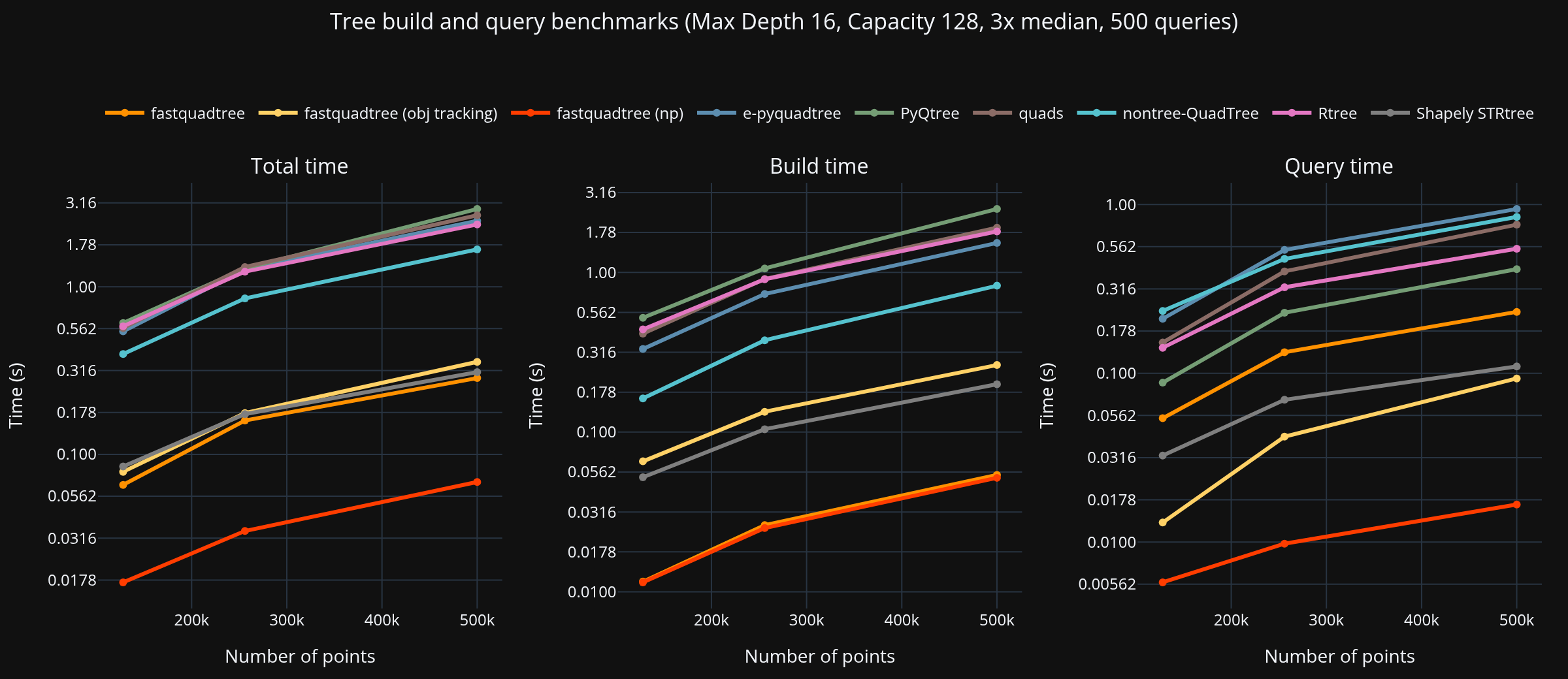
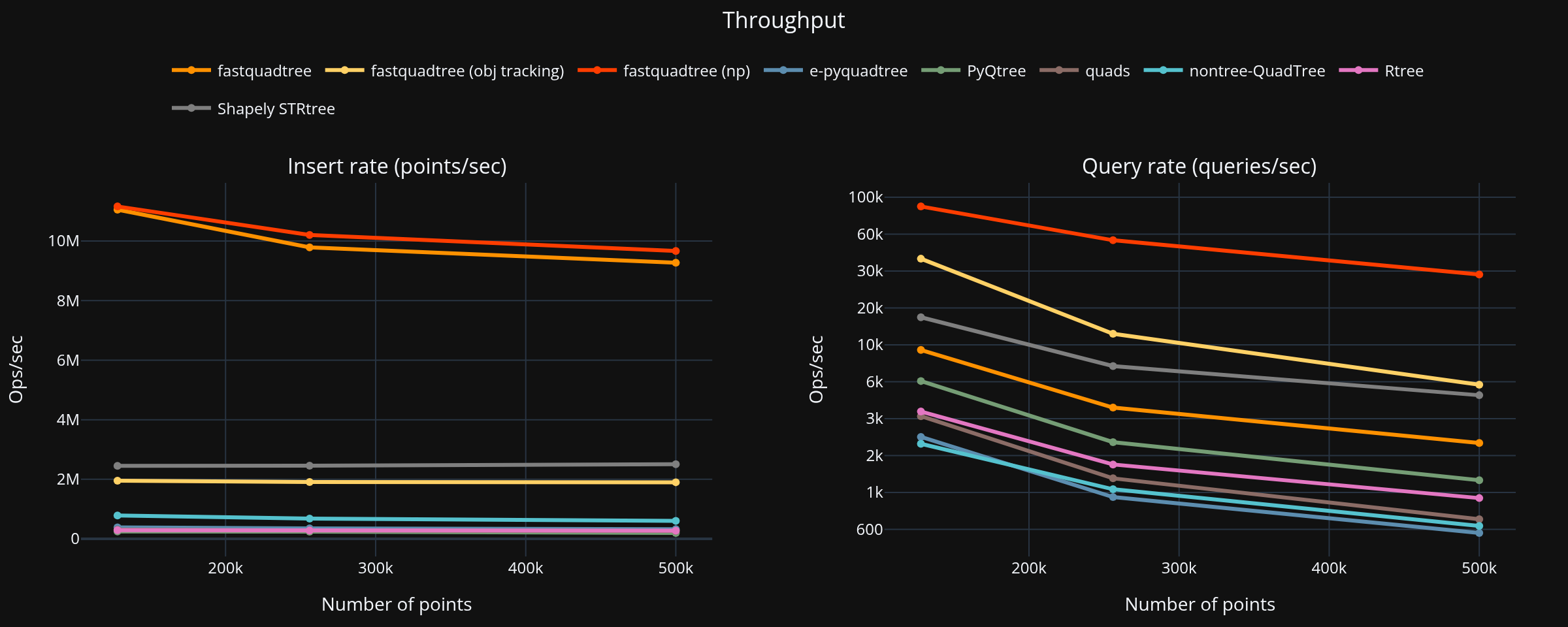
Summary (largest dataset, PyQtree baseline)
- Points: 500,000, Queries: 500
- Fastest total: fastquadtree at 0.068 s
| Library | Build (s) | Query (s) | Total (s) | Speed vs PyQtree |
|---|---|---|---|---|
| fastquadtree (np)1 | 0.052 | 0.017 | 0.068 | 42.52× |
| fastquadtree2 | 0.054 | 0.231 | 0.285 | 10.20× |
| Shapely STRtree3 | 0.200 | 0.110 | 0.309 | 9.40× |
| fastquadtree (obj tracking)4 | 0.263 | 0.093 | 0.356 | 8.17× |
| nontree-QuadTree | 0.826 | 0.844 | 1.670 | 1.74× |
| Rtree | 1.805 | 0.546 | 2.351 | 1.24× |
| e-pyquadtree | 1.530 | 0.941 | 2.471 | 1.18× |
| quads | 1.907 | 0.759 | 2.667 | 1.09× |
| PyQtree | 2.495 | 0.414 | 2.909 | 1.00× |
Benchmark Configuration
| Parameter | Value |
|---|---|
| Bounds | (0, 0, 1000, 1000) |
| Max points per node | 128 |
| Max depth | 16 |
| Queries per experiment | 500 |
Fastquadtree is using query_np to return Numpy arrays rather than typical Python objects
Native vs Shim
Configuration
- Points: 500,000
- Queries: 500
- Repeats: 3
Results
| Variant | Build | Query | Total |
|---|---|---|---|
| Native | 0.140 | 2.364 | 2.504 |
| Native (ID-only query) | 0.136 | 0.434 | 0.570 |
| QuadTree (no objects) | 0.179 | 2.210 | 2.389 |
| QuadTree insert_many (no objects) | 0.058 | 2.085 | 2.143 |
| QuadTreeObjects | 0.599 | 0.732 | 1.331 |
| QuadTree (numpy, no objects) | 0.032 | 0.102 | 0.134 |
Summary
-
The Python shim (QuadTree) is 0.954x slower than the native engine due to Python overhead.
-
NumPy points are the fastest path: build is 5.536x faster than the list path and queries are 21.733x faster, for a 17.822x total speedup vs the list path.
-
QuadTreeObjects adds object association overhead. Build time increases significantly, query time much faster.
pyqtree drop-in shim performance gains
Configuration
- Points: 500,000
- Queries: 500
- Repeats: 3
Results
| Variant | Build | Query | Total |
|---|---|---|---|
| pyqtree (fastquadtree) | 0.326 | 0.801 | 1.127 |
| pyqtree (original) | 2.111 | 9.536 | 11.647 |
Summary
If you directly replace pyqtree with the drop-in fastquadtree.pyqtree.Index shim, you get a build time of 0.326s and query time of 0.801s. This is a total speedup of 10.333x compared to the original pyqtree and requires no code changes.
NumPy Bulk Insert vs Python List Insert
Configuration
- Points: 500,000
- Repeats: 5
- Dtype: float32
Results (median of repeats)
| Variant | Build time |
|---|---|
| NumPy array direct | 42.3 ms |
| Python list insert only | 58.2 ms |
| Python list including conversion | 573.4 ms |
Key:
- NumPy array direct: Using the
insert_many_npmethod with a NumPy array of shape (N, 2). - Python list insert only: Using the
insert_manymethod with a Python list of tuples. - Python list including conversion: Time taken to convert a NumPy array to a Python list of tuples, then inserting.
Summary
If your data is already in a NumPy array, using the insert_many_np method directly with the array is significantly faster than converting to a Python list first.
Serialization vs Rebuild
Configuration
- Points: 1,000,000
- Capacity: 64
- Max depth: 10
- Repeats: 7
Results
| Variant | Mean (s) | Stdev (s) |
|---|---|---|
| Serialize to bytes | 0.021356 | 0.000937 |
| Rebuild from points | 0.106783 | 0.011430 |
| Rebuild from bytes | 0.021754 | 0.001687 |
| Rebuild from file | 0.024887 | 0.001846 |
Summary
- Rebuild from bytes is 4.908747x faster than reinserting points.
- Rebuild from file is 4.290712x faster than reinserting points.
- Serialized blob size is 13,770,328 bytes.
System Info
- OS: CachyOS 6.18.5-2-cachyos x86_64
- Python: CPython 3.14.2
- CPU: AMD Ryzen 7 3700X 8-Core Processor (16 threads)
- Memory: 31.3 GB
- GPU: NVIDIA GeForce RTX 5070 (11.9 GB)
Running Benchmarks
To run the benchmarks yourself, first install the dependencies with uv:
uv will manage a virtual environment for you. To set it up, run:
Then run whichever benchmark scripts you want:
uv run python benchmarks/cross_library_bench.py
uv run python benchmarks/benchmark_native_vs_shim.py
uv run python benchmarks/benchmark_np_vs_list.py
uv run python benchmarks/benchmark_serialization_vs_rebuild.py
Check the CLI arguments for the cross-library benchmark in benchmarks/quadtree_bench/main.py.